Проверка цифровой подписи образов с использованием StarVault
В статье описана настройка проверки цифровой подписи образов в Neuvector.
1. Установка Cosign и настройка StarVault
-
Установите Cosign v2.
curl -fLSo cosign-v2.6.3-linux-amd64.tar.gz <ссылка на репозиторий> (1)-
В зависимости от способа установки добавьте ссылку на репозиторий:
-
Онлайн: https://repo-nova-universe.orionsoft.ru/utils/cosign/v2.6.3/cosign-v2.6.3-linux-amd64.tar.gz
-
Оффлайн: https://repo.<universe_base_domain>/packages/cosign/release/v2.6.3/cosign-v2.6.3-linux-amd64.tar.gz
где <universe_base_domain> — базовый домен, который был установлен при развертывании Nova Universe.
-
Инструкция протестирована на версии v2.6.3.
-
-
Распакуйте архив.
tar -xzf cosign-v2.6.3-linux-amd64.tar.gz --strip-components=1 -
Переместите в директорию
/usr/bin.mv cosign /usr/bin -
Установите переменные окружения для подключения к Starvault:
export VAULT_TOKEN="s.yS2o2guyHGB691R0wJX3GPID" (1)
export VAULT_ADDR="https://nova-oauth.nova.mycompany.local" (2)
1 VAULT_TOKEN— токен root.2 VAULT_ADDR— адрес StarVault внутри кластера Nova. Требования к DNS-записям для встроенных сервисов Nova приведены в разделе Подготовка сетевого окружения. -
Настройте Starvault. Включите механизм управления секретами transit:
starvault secrets enable transitПример выводаSuccess! Enabled the transit secrets engine at: transit/ -
Сгенерируйте ключ для подписи через Cosign.
TRANSIT_SECRET_ENGINE_PATH="transit/" cosign generate-key-pair --kms hashivault://testkeyПример выводаPublic key written to cosign.pubПолучить публичный ключ из пары можно из файла
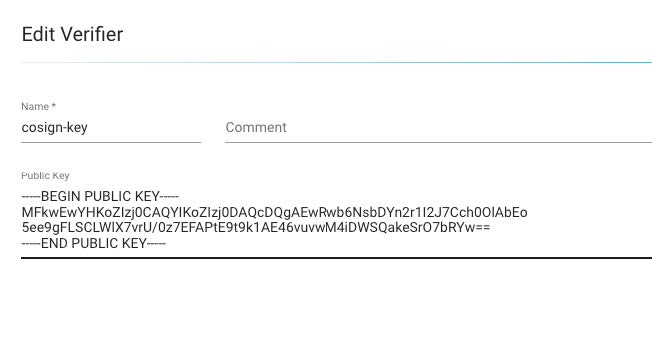
cosign.pub:cat cosign.pubПример вывода-----BEGIN PUBLIC KEY----- MFkwEwYHKoZIzj0CAQYIKoZIzj0DAQcDQgAEwRwb6NsbDYn2r1I2J7Cch0OlAb Eo5ee9gFLSCLWlX7vrU/0z7EFAPtE9t9k1AE46vuvwM4iDWSQakeSrO7bRYw== -----END PUBLIC KEY-----Публичный ключ можно получить позже:
cosign public-key --key hashivault://testkeyПример вывода-----BEGIN PUBLIC KEY----- MFkwEwYHKoZIzj0CAQYIKoZIzj0DAQcDQgAEwRwb6NsbDYn2r1I2J7Cch0OlAbEo 5ee9gFLSCLWlX7vrU/0z7EFAPtE9t9k1AE46vuvwM4iDWSQakeSrO7bRYw== -----END PUBLIC KEY-----
2. Подготовка и подпись образа
-
В примере использован базовый образ nginx:
docker pull nginx:latestПример выводаlatest: Pulling from library/nginx 5b4d6ff92fc4: Already exists 830625e1ac85: Pull complete 5431d0092ffd: Pull complete b4a248c845e5: Pull complete 7f8b1a2b17d8: Pull complete 45381ecb0e2f: Pull complete 13fd728be9eb: Pull complete Digest: sha256:5aca99593157f4ae539a5dec1092a0ad8762f8e2eb1789085a13a0f5622369f6 Status: Downloaded newer image for nginx:latest docker.io/library/nginx:latestdocker tag nginx:latest novarobot/nginx-signed:1.1.1 docker push novarobot/nginx-signed:1.1.1 -
Сгенерируйте ключевую пару и подпишите образ:
cosign sign --key hashivault://testkey novarobot/nginx-signed:1.1.1Пример выводаWARNING: Image reference novarobot/nginx-signed:1.1.1 uses a tag, not a digest, to identify the image to sign. This can lead you to sign a different image than the intended one. Please use a digest (example.com/ubuntu@sha256:abc123...) rather than tag (example.com/ubuntu:latest) for the input to cosign. The ability to refer to images by tag will be removed in a future release. The sigstore service, hosted by sigstore a Series of LF Projects, LLC, is provided pursuant to the Hosted Project Tools Terms of Use, available at https://lfprojects.org/policies/hosted-project-tools-terms-ofuse/. Note that if your submission includes personal data associated with this signed artifact, it will be part of an immutable record. This may include the email address associated with the account with which you authenticate your contractual Agreement. This information will be used for signing this artifact and will be stored in public transparency logs and cannot be removed later, and is subject to the Immutable Record notice at https://lfprojects.org/policies/hosted-project-tools-immutable- records/. By typing 'y', you attest that (1) you are not submitting the personal data of any other person; and (2) you understand and agree to the statement and the Agreement terms at the URLs listed above. Are you sure you would like to continue? [y/N] y tlog entry created with index: 1633349027 Pushing signature to: index.docker.io/novarobot/nginx-signed